I have been using PC with a USB tuner to record HDTV for some time. But my old RPTV Mitsubishi VS-60111 only has component or RGB video inputs for 1080i signal; it is tough to connect it to the PC. I have tried various Nvidia’s solutions in the past; they all failed because the way they support component 1080i resolution is through scaling and re-encode whatever the resolution settings to 1080i. The result was very blur images on this old TV. The other problem is that at in the past not many motherboard has digital audio output for decent audio.
After I updated the TV with the HD Fury to accept HDMI signal and the Yamaha RX-V665 for the new HD audio formats such as DTS-HD MA and DD TrueHD, it is time to revisit the HTPC setup. Before jump into a new HTPC setup however, media players has gaining popularity in recent years and it certainly has its advantages being more like consumer electronics than PC and possible easier for day to day use in a home theater environment.
After looking into the many available media players on the market such as WD TV Live, I was disappointed to found out none of the sub $200 players are capable to act as DVR. In other words, if I get one of these players, I still need the PC to record TV program. Another problem these media player is most of them are not capable to handle HD audio formats. Take TVIX 6620N for example, I have considered it because it can function as DVR. The problem is the TVIX is not only very expensive but also not able to pass through DTS-HD MA and DD TrueHD. For something cost close to $400, I expect more. In addition, TVIX’s local dealer has a rather unfriendly return policy and all the unhappy user feedback on the web make me to give up even give it a try. Then, there are the equally expensive Dune players that seem to be able to handle the DTS-HD HA and DD TrueHD but there is DVR option available. For the price those TVIX and Dune guys ask for, I can build a HTPC and be able to handle both DVR and HD audio.
While it is true, the HTPC can have a lot of issues, lacking proper remote friendly UI is just the most obvious. On the other hand, all those media players seem have their own set of problems too. One just has to search the web to see for example so many unhappy users about them too.
So, at the end I went back to the HTPC option. After the failed trial with XFX GeForce 9300, I have settled with MSI 785GTM-E45 motherboard but only to find out it cannot do HD audio either. The great thing about HTPC is it is expandable and I am not depends on the media player companies to make good on their product. In this case, I added an ATI 5450 graphics and now my HTPC can do both DVR and handle HD audio. To me, this is a better choice by far than any media player on the market today.
Showing posts with label GeForce 9300. Show all posts
Showing posts with label GeForce 9300. Show all posts
Friday, March 26, 2010

Monday, March 22, 2010
MSI 785GTM-E45 Motherboard for HTPC


While the MSI board was not packaged as fancy as the XFX board, it does come with a printed manual! Besides the printed manual, there is also a quick installation guide; driver CD; a SATA cable; a SATA power adapter cable and an IDE cable.

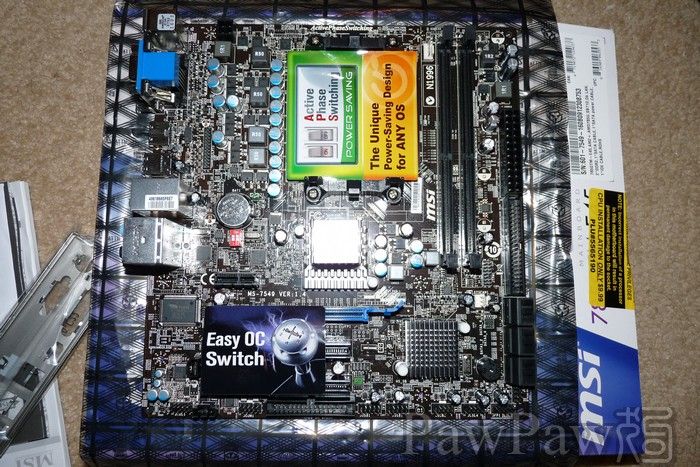
On board, the MSI MB also has 6 SATA ports and unlike the XFX only has 4 of them active on default BIOS settings; all 6 SATA ports are active here. But equall bad as the XFX board, the SATA ports are also facing side rather than up. To make up for the short fall of USB ports compares to the XFX MB on the back panel, this MB has 4 two ports USB connectors on board compare to three on the XFX so the total max. Possible USB ports for both boards are 12 if one buys USB back or front panel brackets to bring the ports out. One thing not so great aboutthis board is it only has two memory slots but this is ok with me as I don't plan to use more than 4GB of memory any way. What is more important to me is this board at least has one IDE port that XFX lacks. This is important for the old IDE based HD DVD drive .
Installation
After the board is installed, updating the driver is quite easy as MSI has an on-line update utility that will check for the latest drivers and BIOS. Updating the BIOS is easy. This factor alone makes the MSI board a far better choice than the XFX.
The BIOS is able to unlock unused core from certain AMD CPUs. Of course, being able to unlock a locked core does not mean it will functon correctly. I tried on my X3 and it hangs which means the 4th core is really a bad one to begin with.
The on board video, ATI 4200 turn out to be somewhat disappointing. I first tried the board with an AMD Athlon 64 5200+ I have. The Windows 7’s Aero scores in a low 3.8. In comparison, the GeForce 9300 of the XFX MB with an Intel Core Duo E4300 that in general performs around the same as the AMD CPU gets a 4.7 Aero score. When I put in the AMD Athlon II X3 440, the Aero score still a low 4.3. Even when over clock t he ATI 4200 from 400MHz to 700MHz, the Aero still not able to compete with the GF9300 with an Aero score of 4.5. It is certainly a disappointing performance to say the least. Especially when the AMD 785 chipset is a newer chipset and it’s ATI 4200 graphics processor is AMD’s top IGP. Over clocking, at least for the on board video is easier and more stable than the XFX board.
Regardless of the Aero performance, the ATI 4200 is capable to playback both HD DVD or Blu-Ray video without any problem. HD audio on the other hand turn out to be very different story. The MSI’s web site somewhat imply this board supports HD audio. What they neglect to make it clear is that HD audio only means the on board Realtek’s audio chip supports 8 ch. analog output. The HDMI port on the other hand only supports two ch. stereo LPCM sounds.
HDMI Setup
After first boot up, the Windows 7 will install the default HDMI driver automatically. Unfortunately, the default Microsoft HDMI driver only supports 2ch audio. Furthermore, the MSI driver CD split the HDMI driver from the chipset driver and requires separate installation. Even after install the ATI HDMI driver from the CD, I still only got 2 ch. Audio. Upon further on-line search, I was dismayed to found out that the AMD 785 chipset only capable to support 2 ch. LPCM output. An updated Realtek HDMI driver on the Realtek’s web site allows pass through of none HD audio stream such as regular 5.1 ch. DD and DTS sound tracks. After download and install the Realtek HDMI driver however, I still only got 2 ch. PCM output. Its only looking into the matter further, I found out there is an option on the Windows Sound manager that need to be selected to support pass through of none LPCM sound tracks. There is NO documentation that I can find on either MSI, AMD or Realtek ‘s web sites to state very clearly what is supported and how to make best use of the on board HDMI connection!
Summary and Conclusion
Pro:
- The board is more stable than the XFX GeForce 9300 board before it.
- MSI has a much better support web site and on-line update driver update mechanism.
- There is a printed manual.
- Able to unlock unused core of AMD CPUs.
- Reasonably easy to over clock for the onboard ATI 4200.
- HDMI, DVDI and VGA video output.
- Total 12 USB and 6 SATA ports.
- HDMI only supports 2 ch. LPCM audio. Even with updated Realtek HDMI driver, it can only support pass though of older 5.1 ch. DD or DTS sound tracks. No HD audio.
- Only 2 memory slots.
- Only 4 USB ports on the back panel. One needs breakout brackets to bring out the rest.
- No SPDIF port on the back panel.
- Performance of the ATI 4200 even over clocked is no match to GeForce 9300.
For people who are happy with regular DD or DTS sound tracks, this is a good board for an all in one setup. If you want DTS HD MA or DD TrueHD however, you still require having an add-on graphics for that.
A not so great experience of the XFX GeForce 9300 Motherboard

I have been using an old ECS motherboard with AGP bus with Intel E4300 Core Duo processor. It is an older board and therefore not only lacking HDMI connector, it does not even support HDTV resolutions and that make it rather difficult to connect to an even older 1080i RPTV. Furthermore, the board has no support for HD audio formats such as DTS HD MA or DD TrueHD. In fact, like most of the entry level boards, even it has SPDIF connectors inside the board, it is not on the back panel and does not came with a bracket to bring it out either making difficult to get even the none HD digital audio such as DTS or DD out. Since AGP is a dead bus format, it is clear I need at least a new MB if not a new MB and a new graphics card.
My first choice for the replacement is this XFX GeForce 9300 MI-9300-7AS9 motherboard. Unfortunately, as it turned out, this was a mistake for several reasons, but I am ahead of myself. The reason I choose this board is not only it has HDMI, DVI and VGA video output; it also has 6 USB and 1 ESATA connectors at the back panel. Although I have seen many reviews said the GeForce 9300 is not capable of output DTS HD MA or DD TrueHD bit stream, I feel I can live with it, as long as it can output 8 ch. LPCM.
The board is packaged in attractive double box.

While the board itself is very attractive looking, the included content is on the short side. It only contains a back panel bracket; a SATA power connector adapter cable; a SATA data cable; driver CD and quick installation guide. There was NO printed manual! This was the first motherboard I have ever encountered that does not come with a printed manual and it was a very unpleasant surprise.
Before I got the board I was already somewhat concern with XFX’s web site is on the slim side compares to other motherboard makers. To make matter worse, they have a very paranoid way of support that require customer to register first in order to gain access to driver down load etc. Again, XFX is first and only of PC board maker I have ever seen require customers to register in order to access the support section of the web. But that’s not all! Once I got to the support section of the web, I found out there are really no updated driver or BIOS beyond what was already on the CD or the board. This is 2010 and the latest BIOS is dated 2008! Furthermore, they did not include BIOS flash utility to update the BIOS and the CD update matter failed because they did not set up file name correctly. All these issue bode ill for XFX’s customers.
Regardless, the board itself looks attractive and much better than the old ECS board. Installation wasn’t a problem either. After I installed the board and powered it on, it worked despite the drivers and BIOS were old. I down loaded various components such as motherboard chipset and graphics drivers from the components makers such as Nvidia’s web site.
There were some things else I did not realize this board is lacking before I brought it. First, there is no older IDE support. While this may or may not be a problem for some people, it is to me as my HD DVD drive is an IDE drive. Since no one is making HD DVD drive anymore, if I want to keep playing HD DVD, I need to buy an IDE to SATA adapter. Not only it will be an additional cost, most of time seems are hit and miss at best with many users. The second issue is this board does not have a PS/2 mouse port. Again, this may or may not be a problem to some people but I have a two PC KVM switch that only works with PS/2 keyboard and mouse. It is a nuisance to have to keep two mice on the desk or have to get yet another adapter.
One other thing I don’t like is the SATA connectors are facing sides rather than up to save board space. While some people may like it, I don’t. Once the board is installed inside the case, it is impossible to see these connectors. Once has to use touch feeling to connect new drives. Although it says it has 6 SATA ports, only 4 are available under default BIOS settings.
The on board GeForce 9300 performed quite a bit better than the GeForce 7050 on board the old motherboard. The Window 7’s Aero scores jumped from 3 something to 4.7. Unfortunately, things went downhill from there.
After the installation, I let it running for the burn in process. On the fourth day morning I found the board went dead overnight. Just to be sure, I put the CPU and memory back to the old ECS MB and it boot up nicely. This means the new board is really dead and the choices are either return the board for replacement or return the board for refund. In view of the out dated drivers on XFX’s web site and not much else and the fact that this is the only MB died on me for the last 10-15 years, I did not want to waste for time on replacement and opt for refund.
Because I have not got the chance to try the HDMI port before it went dead on me, I was not able to it in HTPC settings. For the short time I have with the board, I can summarized the pro and con as follow,
Pro:
- Attractive looking board. Good size heat sink on the chipset.
- Have 6 USB and 1 ESATA port on back panel.
- HDMI, DVI and VGA port.
- CMOS reset button on the back panel. Good for people who want to try out on the edge BIOS settings.
- On board GeForce 9300 is a decent performer and probably one of the better IGP.
Con:
- The board went dead in less than four days.
- No printed manual.
- Out dated drivers and BIOS. No BIOS update utility and the CD update version does not work due to wrong file name used.
- Require registration to gain access to a very slim that close to nothing web support pages.
- Side facing SATA ports.
- Only 4 SATA ports are available on default BIOS settings.
- No SPDIF port on back panel.
- I did not try it but looking at the BIOS setting options, it does not appear it is capable to do much over clocking if any.
Because of this not so good experience, I probably will not buy any XFX products any time soon. Luckily for me, there was a sale on AMD Athlon II X3 440 processor plus MSI MB bundle on sale for only $10 more than this XFX board. Although the on board ATI 4200's video performance on the MSI board was not even close to this XFX board, I am much happy with that purchase.
Subscribe to:
Posts (Atom)